Using a Helper Script
Executing shef.shef_parser.main() from the command line can be tricky since you need to know
the exact location of the package in your installation.
Inspecting/Updating Execution Path
The easiest way is to use a helper script that is placed somewhere referenced by your PATH environment variable. You can inspect and set this variable from the command line in the following manner.
Windows
- From Command Prompt
inspect:
echo %Path%set:
set Path=%Path%;<another_directory>
- From PowerShell
inspect:
$Env:Pathor$Env:Path -split ';'set:
$Env:Path += <another_directory>
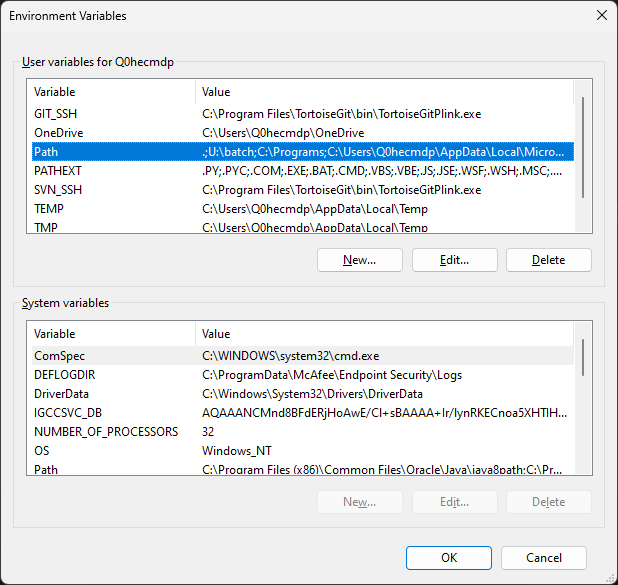
- From Windows UI
type
envvarin the Windows search bar and open “Edit environment variables for your account”Windows UI
Linux
inspect:
echo $PATHset:
export PATH=$PATH:<another_directory>
Helper Script
Once you know which directory to put your helper script in, create a helper script file as follows:
- Windows
run_shef_parser.bat@python -c "import sys; import shef; import subprocess; subprocess.run([sys.executable, shef.shef_parser.__file__]+sys.argv[1:], check=True)" %*
- Linux
run_shef_parser#!/usr/bin/env bash python -c "import sys; import shef; import subprocess; subprocess.run([sys.executable, shef.shef_parser.__file__]+sys.argv[1:], check=True)" "$*"
Don’t forget to make the script executable:
chmod u+x /path/to/run_shef_parser
Note that you may need to have your script use python3 -c instead of python -c, depending on your python installation.
Now from any command line you can simply execute run_shef_parser <options> to execute the SHEF parser.